AMD Reaches the Summit with Ryzen 5000

AMD Reaches the Summit with Ryzen 5000


First came the AMD Ryzen Threadripper, the high-performance CPU which signalled that AMD, amid a sea of Intel processors, was ready to be taken seriously again—especially by post-production professionals working in media and entertainment. In fact, the 3rd generation Threadripper is key to APEXX T4, the first Avid-qualified BOXX workstation also noteworthy for a few other firsts: the first Avid-certified AMD CPU, the first single CPU with 64-cores, and the first (and only) CPU that can edit 8K RAW video. Now, AMD is back with another new processor and once again, it’s resoundingly clear that within the CPU marketplace, they are firmly planting their flag.

The new AMD Ryzen™ 5000 Series processors have arrived, and although much of the online hype surrounding them focuses on gaming, don’t be distracted by it (unless you’re big into gaming, of course). The fact is, these CPUs are outstanding for creative pros, delivering best-in-class performance[i] for a variety of professional software applications from CAD and 3D design, to motion media, VR, and more. The new processors provide 16 cores/32 threads at 4.9GHz with available overclocking through performance boost overdrive[ii] (PBO), up to 40 PCIe® 4.0 lanes, and 19%[iii] instructions per cycle (IPC) improvement over the previous generation.

So, whether you’re 3D modelling, rendering complex scenes, running simulations, or powering VR, the Ryzen 500 Series will enable you to simultaneously multitask in SOLIDWORKS, Autodesk Revit, 3ds Max, Maya, Arnold, Cinema 4D, Adobe CC, V-Ray, and other professional applications—without sacrificing performance.

If that’s not enough good news, these state-of-the art processors are available now inside the BOXX APEXX Denali A3 workstation. Denali, you ask? Yes, because this machine will enable you to reach the summit of application performance, conquer your most demanding workflow, scale new heights of creativity/productivity and…APEXX Mount McKinley (the highest North American peak’s former moniker) doesn’t exactly roll off the tongue. Kidding aside, Denali, powered by this processor, is indeed a game changer and as always, BOXX is first to market because of our decades-long commitment to providing creators with the best technology as soon as it becomes available.

In addition to the Ryzen CPU, the liquid-cooled Denali boasts up to two professional-grade AMD Radeon Pro™ or NVIDIA® RTX™ GPUs (with next-gen NVIDIA Ampere upgrades available by year’s end), up to 128GB of RAM, best-in-class connectivity with 10GB Ethernet and Thunderbolt 3, and Samsung 980 Pro PCIe® 4.0 NVMe SSDs for maximum graphics and storage throughput.

APEXX Denali with the AMD Ryzen 5000 Series CPU is highly configurable, so call a BOXX performance specialist today at 01256378044.BOXX to configure yours, or order email us at BoxxUK@centerprise.co.uk

__________________________________________________________________

[i] Testing by AMD performance labs as of 09/01/2020. Multi-core performance evaluated with Cinebench R20 nT with a similarly configured Ryzen 9 5950X vs. a Core i9-10900K. Results may vary. R5K-005

[ii] Precision Boost Overdrive requires a compatible AMD Ryzen Threadripper, 3rd Gen AMD Ryzen processor or AMD Ryzen 5000 Series processor and a motherboard compatible with one or more of these processors. AMD 2nd Gen Ryzen processors including the Ryzen 3200G processor are not compatible with Precision Boost Overdrive. Because Precision Boost Overdrive enables the operation of the processor outside of specifications and in excess of factory settings, the use of the feature invalidates the AMD product warranty and may also void warranties offered by the system manufacturer or retailer. GD-135.

[iii] Testing by AMD performance labs as of 09/01/2020. IPC evaluated with a selection of 25 workloads running at a locked 4GHz frequency on 8-core “Zen 2” Ryzen 7 3800XT and “Zen 3” Ryzen 7 5800X desktop processors configured with Windows® 10, NVIDIA GeForce RTX 2080 Ti (451.77), Samsung 860 Pro SSD, and 2x8GB DDR4-3600. Results may vary. R5K-003

The Benefits of High-Density Interconnect PCBs

The Benefits of High-Density Interconnect PCBs

Today’s animators, video editors, and people working in similar areas require highly capable computers in order to do their jobs effectively. It’s for this reason that we highlight new and powerful processing developments, such as the latest from Intel or the ‘Versatile CPU for Versatile Workflows’ — the AMD 3950X — that we wrote about last November. CPUs of this calibre simply make it easier for creators to draw the high-frequency power they need without overheating (or otherwise overwhelming) their computers.

This isn’t merely a concern for creators who happen to be particularly picky about their equipment, either. In fact, as our computers get more and more advanced, differences in processing power and storage capabilities are among the first features mentioned when the needs of designers and animators are considered. For graphic designers, a desktop workstation equipped with 4-8 CPU cores will easily run their software applications, while at least 8GB of RAM, 256GB of SSD storage, and fast memory enable multi-layered, high-res documents.

Amidst all the consideration for robust CPUs for complex, design- and editing-related workflows, however, the circuit boards that typically house CPUs (and GPUs for that matter) can be overlooked. Motherboards and printed circuit boards have also improved in recent years, however, sometimes in ways that have helped to enable smoother and more powerful computers for video editing, animation, and other functions.

The widespread emergence of HDI PCBs — high-density interconnect printed circuit boards, that is — has been particularly noteworthy. While HDI PCBs are not brand new, their influence on modern devices has become clearer of late. And while these particular types of PCBs are perhaps best known for their application in smartphones and tablets, they’re also useful in laptops and desktop computers. The specific benefits of HDI PCBs include the following:

Tighter Designs

The “high-density” nature of these PCBs means that they quite literally take up less physical space. Specifically, design features like blind vias and buried vias (which essentially cut down on space used for connections between PCB layers) enable more compact builds. This in turn makes these circuit boards more versatile.

Lighter Material ​

Standard PCBs use a wide variety of materials, but often include some combination of copper, fibreglass, aluminium, and other metals that can be cumbersome and, in some cases, heavy. By contrast, HDI PCBs can be lighter and cooler. A list of materials for HDI provided by Altium shows the specifics, as well as how much each material is used. By and large these materials enable better performance without adding bulk or making the PCBs more likely to overheat.

Reliability​

The specific designs of HDI PCBs make them physically reliable, such that connections are less likely to be compromised.

Sharper Signals

Most important of all is that because these PCBs are literally more compact, signals have less distance to travel during the transmission process. Clearly, this makes for a subtle difference compared to other PCBs, but it can result in sharper performance for those executing creative projects.

Altogether these perks speak to why HDI PCBs are now the preferred options in lots of modern devices, as well as why they can contribute to the stronger computing performance that video editors, animators, and the like require. High-performance CPUs and GPUs may still be the most important factors, but a modern HDI PCB can contribute by making a computer lighter, more reliable, and just a little bit quicker.

Because HDI PCB technology has been pervasive throughout the PC industry for some time, it allows BOXX Technologies to better optimize CPU, GPU, memory, or I/O performance. For information on how BOXX delivers the most value for your technology pound, check out our systems available or contact a performance specialist to configure the ideal system for your needs at 01256 378 044

Engineering in Grams (customer story)

Engineering in Grams (customer story)

When conversing with Jay White of White Engineering, the listener is immediately captivated by what he has to say, not only because the subject matter is fascinating, but also because White has a genuine knack for talking about it. A former NCAA skier at Oregon State, White graduated in engineering physics, and then went to work in a Portland, Oregon sporting goods store. “It’s what everybody does when they get out of college after four years,” White deadpans. In actuality, it was a high-end ski shop where he purchased a lot of racing equipment while also coaching his last year at OSU. As a result, the engineer took a decided interest in the human foot, primarily, how to better fit a ski boot.

Hampered by a snow drought in the late 1970s, White had time on his hands, so he developed a computerized ski boot fitting capturing 3D pictures of feet. This led to the founding of Foot Image Technology in partnership with Hewlett Packard. “We took their document scanners and made them foot scanners,” White recalls, “recommending ski boots across North America and Australia.” This fostered an interest in sport body data capture which led to a project with the Australian army scanning 5000 soldiers from the knee down and developing an army GP boot. He then went to work for Adidas special projects, where then vice president Robert Erb hired White as a special consultant on customized athletic shoes for Notre Dame and Tennessee football, as well as former Celtic Antoine Walker and Lakers great Kobe Bryant.

After a while, White began hitting golf balls off of various summits (including Mount Everest) sponsored by TaylorMade, Adidas, Woolrich, and Solomon. “Just clowning around, climbing” he says. “But I had to have something that would help me pay the bills as all climbers do.” A five-year stint at TaylorMade began in 2000 where White worked with golf ball flight. He also developed hardware cameras for the company’s motion capture system. When TaylorMade execs moved to Fila, they brought White along, putting him on their Fila Adatto custom shoe project. “You’d walk into their store on 5th Avenue and we’d 3D scan your foot,” White recalls. “Select three different insole thicknesses, five different arch pieces, two different forefoot pieces, two different heel pieces, and in ten minutes, cobble together a custom shoe for you. It went worldwide, so I was travelling all over.”

Eventually, White went to work for Natural Point, the largest producer of motion capture equipment based in Corvallis, Oregon. This took him inside a wind tunnel at Scottsdale Cycling Specific where he worked with United Health Care, as well as sponsored and unsponsored athletes alike to help them achieve optimal cycling aerodynamics.

White designed all wind tunnel balance components (load cells, rotating motors, stepper motors, ultra-fast camera systems) which measure the rider in micrograms within the airflow. By 2012, he and his team determined that wind tunnels were akin to “hitting aerodynamics with a sledgehammer.” He wanted to know how much drag was on the athlete’s foot and knees or how a helmet texture impacted drag. “The tool for that is computational fluid dynamics (CFD),” says White. “Most of those using aerodynamics for athletes would truncate a cylinder for the forearm, a sphere for your head, poke on their helmet and the bike would be horribly tubular. We wanted to get absolutely perfect models of bodies, which are avatars for athletes that move like athletes, look like athletes, wear shirts, pants, shoes, buttons, etc. and the bike is going to be like a Specialized Tarmac with the derailer, chain, and all—not a helmet on a stick figure.”

The Hunt for Reducing Grams

A hundred grams of drag reduction = one second per kilometer on the bike. This is irrespective of velocity. “If you’re at 30 miles per hour like Mark Cavendish and you’re competing in the Tour de France, you’re going to travel that kilometer one second faster, “says White. “So if a helmet signature in a 12K time trial is reduced one hundred grams, you’re going to be 12 seconds faster. That helmet modification moves you from third to first place. We’re hunting 20 grams or so, and you can’t detect that in a wind tunnel. Impossible.”

The hunt for reducing grams also involves textures, which are all velocity specific. Paint, (gloss or matte finish) for example, adds texture to the Oakley helmet and how one buries that paint at 30 miles per hour, can result in anywhere from eight to 22 grams less drag. White can also recommend helmet decals that provide changes for a particular velocity zone. “If I can do a simulation quickly enough,” he says, “a consumer can send a video of themselves and a bike, and we can position the avatar from it. You ride a Specialized Tarmac and wear an Oakley AR05 at 17 miles an hour. What decals should you have? If I can kick that out in 20 minutes, then I don’t have to charge you $500 for a CFD. Based on my data, I can tell you to buy a $100 decal set from Oakley and you’re good to go.”

White and his team house a database of thousands of avatars (and can easily create new ones) which is why manufacturers like Oakley, Red Bull, and Schutt, have taken notice. Now he produces simulations (with a BOXX APEXX S3 workstation) for elite athletes like cyclist Mark Cavendish and former Olympic skier Linsey Vonn. With the fully functional athlete avatar, White can do real simulations with CFD, hydrodynamics, and thermodynamics based on how an athlete is moving and match all of that data back to the real athlete. The numbers coming across are not actual, but they do follow actual numbers to the account that the deltas between these two positions are exactly what they’ll see on the road, in the surf, on the football field, etc.

Schutt Helmets
Speaking of football, Robert Erb came calling again in the fall of 2018 with a project designing new Schutt football helmets—but it got off to a rocky start. “Legal said I couldn’t use a non-contact scanner because somebody else claimed that they owned it,” White recalls, “so I had to create a contact scanner. I walked out of the room the last week of October, called my guys and told them we had to make a helmet in order to take measurements. Could we do it? Yep. When do we have to have this? For the AFCA show the first week of January, 2019. Nobody can do that, but my guys did. We came up with a very good system with roughly 12 sensors in a UR1-FC football helmet. UR1 is the actual helmet shell and FC means ‘full contact.’ It’s a measurement device with servo motors inside. They pull the arms out of the way because many football players have rather interesting hairdos and the non-contact scanner can’t see through all that hair. What we developed is a full contact one where the servo is retracted. You put the full contact on, you hit a software button, arms come up, they reach through your hair and they measure your head. Now if you just took those measurements and tried to fit a helmet, you’re not going to do very well because there are actually 20 fit locations where you can put pods. So we take that data and we use it to find the closest avatar, which is the closest actual football scanned head in our 3D database that matches those measurements.”
Next, White virtually inserts that 3D head into the Schutt helmet and selects pods to put pounds per square inch on the head. A computer is necessary because pods come in three different thicknesses: 11, 17, or 22 millimeters, as well two different densities: technically soft/squishy or firm/ less squishy velocity sensitive foam. Like a Tempur-Pedic mattress, push rapidly and it resists a lot, push slowly and it takes the shape of your hand. The velocity with which you hit it determines how quickly it moves.
“Whenever you put a nonlinear changing device on an athlete, his perception of pressure is going to change from the first second until it’s settled on his head a minute or two later,” says White. “We had to predict how he’s going to feel a minute or two later by taking 12 measurements on the head and inserting 20 pods. It’s computationally intense because there are 3.69 quadrillion possible combinations and a couple of 10,000 practical. A practical is not putting an A thickness right next to a C thickness pod because your head surface doesn’t have marbles in it. It’s more of a smooth, organic surface. We’re developing a science that will predict what pressure the athlete’s going to want and allow him to grab a slider and move it to what he really likes. Some like a super tight helmet, but any athlete who’s putting on a garment is going to want it to fit tight, whether it’s gloves or helmet because they want it as an extension of their body. The U.S. women’s soccer team shoes are extremely close to their foot—undersized. Why? Because if the leather hits the ball and then there’s a void and then there’s a foot, then you’re not getting as much snap on the ball.”
In comparison, football players don’t want the helmet to jiggle on their head, especially when tackling, which results in additional forces. If they absorb an impact to the head and the helmet shifts to the side, they can’t see the ball. What White describes is incredibly straightforward—the sizing of the helmet, however, due to the possible combinations and the detailed process involved in pressure mapping the athlete, it’s also extremely intense. There exist other important football helmet corollaries which involve aerodynamics (reducing that crucial 40-yard sprint time) and thermodynamics (keeping the football player’s head cooler to avoid heatstroke), but so much of it boils down to comfort. “A comfortable athlete is a happier athlete,” White says, “and a happier athlete performs better.”
Applications & Challenges
Due to the fluid movement advantages of 3ds Max, White builds his models using the software and then, with the help of a special conversion engine, converts them into SOLIDWORKS forms. As the models go in, White says they get stacked like an “old-fashioned rotoscope”, and that is how he makes SOLIDWORKS move. In addition to these applications, White Engineering relies on its own software, ARE (avatar rendering engine) which takes 3D-imaged athletes and makes them into a movable FBX avatar. It looks, moves, and has bone structure just like the actual human athlete, right down to blinking eyes. They also employ tools from nPower which takes the images from elemental space (triangles and polygons) into sub-D surface modelling in SOLIDWORKS. The engineers also run multiple simulation engines.
The team’s biggest workflow challenge is the aforementioned conversion since with their Dell workstation typically took an hour to convert a model. Bringing in four or five models in different leg positions could require an entire day. Time is money. White emphasizes that the Schutt football helmet is designed to work with any individual athlete, from high school to pro. “You don’t have to be Tom Brady to afford one of these,” he says, “so it’s very punishing if I have an expensive delivery system to create the avatar because that ultimately increases the helmet’s retail price. The simulations have to be wonderfully brisk. They can’t take up to two hours on a computer because that would just kill us. That’s why my BOXX system is so important.”
When White began searching for a better computer, an online search led him to BOXX and ultimately, to BOXX performance specialist Bud Wainwright. “Bud is unique,” says White, “because he treats a guy who is going to buy one or two computers every year like I’m Lucasfilm. I get that same level of attention and I appreciate it. Another thing that swung me was Bud succinctly said, “Jay, you’re not buying a CPU and chips. You’re buying a heat management system and within that, your chips are going to run.’ I watch it every day displayed on a 65 inch 4K flat panel. It’s always at 4.97 when all 18 cores are going for hours. That’s the value I wanted. The Dell would kick up for a few microseconds to 3.8, 3.9 and fall back to 2.2 as it finishes in the next two days. It doesn’t take a genius to figure out that 2.2 is half as fast as five, right? If you’re going to spend money on a chip, but can’t run it cool, why spend the money?”

How to Use Your Computer to Fight the Coronavirus

How to Use Your Computer to Fight the Coronavirus


Trade shows are being canceled. Sporting events are being suspended. Disney World is closed. We’re living in very strange times—but it’s not all bad news. Thanks to advancements in technology, the average person is better prepared to help solve the world’s biggest problems than ever before.

Enter Folding@home, a distributed computing project for disease research. Even though they’ve been around for twenty years, lately their popularity has soared, and for good reason. Their research touches many different areas; however, their main focus right now, as you may have guessed, is researching COVID-19.

To give you a basic idea of what they do, I’ll simply quote the project’s blog: “[they’re] simulating the dynamics of COVID-19 proteins to hunt for new therapeutic opportunities.”*

Viruses are like tiny machines, but it’s not yet clear exactly how these particular machines work. By running lots (and lots) of simulations, which require lots (and lots) of computing power, we can gain insights into which drug treatments are most effective in order to save lives and curb the spread of the virus, and eventually create a vaccine.

By signing up for the project (which is free), you allow them to utilize some of your computer’s resources to perform biomedical research. To give you an idea of what that work looks like, this video shows a protein simulation in action. And yes, they’re always that wiggly.

In the midst of all the confusion, misinformation, and everyone buying all the toilet paper, it’s been refreshing to see some companies doing what they can to help. For instance, recently our friends over at NVIDIA called on all PC enthusiasts via Reddit and Twitter to sign up for Folding@home. They received an overwhelming response, and for a bit, so did their servers. This is exciting news, as NVIDIA GPUs are very good at the sort of computing tasks that several of Folding@home’s coronavirus-related projects rely on.

Speaking of, if you already happen to own a BOXX system, particularly one of our 4-GPU or 8-GPU RAXX models, there’s a chance you could have a substantial impact on that research in-between, say, your daily rendering jobs or deep neural network training. However, if you wanted the ultimate simulation workstation, you’d need our massive 16-GPU system, the RAXX P6G Jupiter, so named because it’s packed with so many video cards that it practically creates its own gravitational field.**

The RAXX P6G Jupiter, seen here with enough GPUs to power a tiny island nation.

To do our part, BOXX is currently using one of our P6G Jupiter systems in the lab to fold some proteins as well (Team #244790). But the great thing about Folding@home is that you don’t need a massive 16-GPU workstation to make a difference. Any computer with an internet connection can help. It’s all about the cumulative effect of individuals, and not the work of any one system. However, the more powerful your computer, the more you can contribute.

In addition to being a worthy cause, Folding@home is very flexible in terms of its usability. For example, you can easily adjust the type and amount of resources it uses while it runs in the background. You can also tell it to only start when the PC is idle, or you can simply pause it as needed. You can also join teams, track your contributions, and even compare your participation to others.

It’s also worth noting that Folding@home isn’t the only game in town. There are many distributed computing projects all around the world that support all kinds of research, such as astrophysics, cryptography, mathematics, robotics, and seismology.*** Lastly, it’s important to remember that, due to the nature of how these projects work, contributing may increase your electricity bill to some degree.

So, do you have an old computer collecting dust that you can put to work? Or do you want to let your current workstation do some sciencing on the side? (Alternatively, you can use an Android phone as well.) If you’re interested, you can sign up here.

BOXX is a leading manufacturer of purpose-built workstations that accelerate productivity for many professional workloads in multiple industries, including manufacturing & product design, media & entertainment, and data science. To learn more, visit our website or consult with a BOXX performance specialist today.

__________________________________________________________________

* Source.

** May not be 100% scientifically accurate.

*** List of distributed computing projects (Wikipedia).

Testing V-Ray GPU Rendering with NVIDIA NVLink

Testing V-Ray GPU Rendering with NVIDIA NVLink


As GPU technology has advanced over the years, GPU rendering has become more advanced and popular due to its speed advantage over CPUs in visual rendering. In addition, a GPU rendering workstation is much more flexible and scalable than a CPU workstation, with many being able to fit two, four, or even eight GPUs. The main drawback to GPU rendering is the limited VRAM for each GPU. In the past, even the top GPUs had only 24 or 32GB of VRAM, compared to CPU rendering workstations that could easily pack 128GB or more of RAM.

However, with last year’s launch of the RTX GPUs and the introduction of NVLink to the Quadro, Titan, and GeForce lines, it is possible to have nearly 96 GB of VRAM available for rendering when using two Quadro RTX 8000s due to the memory pooling capabilities of NVLink. Even if you don’t need a full 96 GB of VRAM, NVLink has now made it extremely affordable to get 22 GB of VRAM with two RTX 2080 Tis — at a third of the price of the past generation 24 GB option and offers over twice the performance. With these recent advancements, GPU rendering is becoming a more and more viable solution, retaining its speed advantage over CPU rendering while increasing the capacity for complex professional renders.

To better understand the functionality of NVLink in V-Ray, we tested four of the top NVIDIA GPUs in the APEXX Enigma S3, a BOXX workstation designed specifically for dual-card GPU rendering. This Enigma S3 is powered by an overclocked Intel i9-9900k, a perfect combination of clock speed and thread count excellent for driving GPU rendering and viewport manipulation that can also be used for hybrid rendering if you want an extra speed boost.

To ensure that the I/O and memory of the system were not causing any bottlenecks, each configuration was tested with 64GB of Samsung DDR4 at 2666 MHz and a Samsung 970 Pro 512 GB NVMe SSD.

Because the 9th Gen Intel processors used in this workstation only have 16 PCIe lanes to communicate with PCIe devices, normally if you were to use two GPUs the 16 lanes would be split into two 8x connections for each of the GPUs. However, the Enigma S3 is designed for multi-GPU setups so the motherboard includes a PCIe switch that can provide each of the GPUs with up to the full 16 PCIe lanes to communicate with the CPU. Alternatively, if you want to add a less powerful third graphics card to edit scenes in the viewport and run your monitors while you use the other two GPUs for rendering, the PCIe switch will keep the rendering GPUs at 16x and 8x. Meanwhile, the viewport GPU can be at 8x, compared to a non-PCIe switch setup where the cards would be at 8x/4x/4x

In our first test, we ran the V-Ray Next 4.10.05 GPU benchmark on both the single and dual card setups to get a good idea of both the scaling and relative speed of the cards. In the tests, we ran only the GPU segment of the test using one or two GPUs (not hybrid rendering with the i9-9900k). It is also important to note that for this test, NVLink was off.

For a more memory-intensive render, Chaos Group provided us with the City GPU scene in Autodesk 3ds Max. When rendering the scene at 4K on a single card, we saw 29GB of VRAM usage, meaning that the 2080 Ti, Titan RTX, and RTX 6000 were unable to render the scene without NVLink. However, once the NVLink bridge was installed and activated, the Titan RTX and RTX 6000 graphics cards could complete the render as well as the RTX 8000 GPU.

Moving to NVLink, we did see around a 12% performance loss, but this still puts the GPUs far ahead of their CPU competitors and is well worth the nearly doubled VRAM. In addition, if NVLink is not needed (for example, for the RTX 8000 in this scene), it can be easily toggled in the NVIDIA Control Panel by selecting either “Maximize 3D performance” or “Disable SLI” in the SLI Configuration tab.

The NVIDIA Quadro RTX 8000, Quadro RTX 6000, and Titan RTX are also very close in the City GPU benchmark although the Quadros do come out slightly ahead of the Titan both with and without NVLink. This could be because of the dual fan design of the Titan cooler, which is less optimal for multi-GPU setups compared to the blower style Quadros, or the marginally slower base clock speed (although the boost clock speed is consistent for all three). In addition, the larger memory size of the RTX 8000 likely allows V-Ray to use more memory which can be more optimal for speed.

For dual card rendering in the Enigma S3, I recommend the NVIDIA GeForce RTX 2080 Ti, the Titan RTX, or the Quadro RTX 8000, based on how much VRAM you require. If you need an even faster four or eight GPU setup like the BOXX APEXX S4, APEXX X4, APEXX T4, APEXX W8R, or APEXX D8R, I would advise going with the Quadro RTX 6000 GPUs instead of the Titan RTX GPUs for a configuration that has around 48GB of VRAM. Unfortunately, while all the other cards mentioned may be purchased with blower coolers for multi-GPU setups, only the Titan comes with the Founders Edition dual-fan cooler that overheats when placed adjacent to other cards.

Looking to the future, GPU rendering is extremely promising. The new NVIDIA Turing RTX graphics cards already save valuable time over the previous Pascal generation, and this is before the new RT cores are utilized by V-Ray (although their Tensor Cores are used in the NVIDIA OptiX AI Denoiser implemented in V-Ray Next). According to Chaos Group, there is an internal build of V-Ray GPU in the works that offers a speed boost of 47-78% for RTX cards, with more performance gains expected in the coming months of development.* In fact, according to preliminary testing done by Chaos Group, the 2080 Ti with RT core support will more than double the performance of the 1080 Ti. Additionally, Chaos Group’s work on out-of-core geometry for the GPU engine will further reduce VRAM usage, making GPU rendering both more accessible and more efficient for geometrically complex scenes. As GPU and GPU rendering technology progresses, I expect GPU rendering will become even more widespread and eventually take over as the main production render in most workflows.

* https://www.chaosgroup.com/blog/profiling-the-nvidia-rtx-cards#


BOXX Workstations: An Exercise in Decision-Making

BOXX Workstations: An Exercise in Decision-Making


There are a number of things creative professionals should consider when choosing a new BOXX workstation. Among the most important is knowing you’re getting your money’s worth, both in the short-term and the long-term. To do that, you need to know exactly which hardware is best for the software you use and to do that, you need to look at benchmarks. Today, I’ll be going through one workflow example and decide which BOXX system is the best fit.

Let’s say your current system could use an upgrade, and your workflow involves creating models in Revit, followed by exporting those models to Blender for rendering.

Next, let’s decide on three goals for your new workstation:

  1. Speed up rendering in Blender.

  2. Speed up model creation in Revit.

  3. Find the model with the best price-performance ratio.

Before we get to the benchmarks, it’s good to point out that I chose models that all use the same chassis in an effort to normalize the price comparisons. However, within each class, you often have a couple chassis options depending on things like how many hard drives or GPUs you want. For example, the APEXX X3 offers up to two GPUs at full bandwidth and up to two 3.5” hard drives, while the APEXX X4—which uses the same processor—offers up to four 3.5” hard drives and up to four GPUs at full bandwidth.* Additionally, know that there is some overlap in the CPU options for some models.**

Blender, Classroom Benchmark

Blender is a tile-based renderer, which means it subdivides rendering jobs into many discrete sections that are completed in parallel. The more CPU cores you have, the more sections can be completed simultaneously, and the faster you can complete a render job. Knowing that it scales much like you’d expect, with higher-core processors showing progressively shorter render times.

I’ve also included an approximate starting price for the CPU configurations shown. It’s important to note that prices can and often do fluctuate, especially when customizing a system (e.g., adding hard drives, more RAM, video cards, etc.). The numbers used here are approximations and intended only to be used as a means for comparison.

Assuming you plan on rendering in Blender on the CPU, it makes sense to choose a model with a high core count. Let’s say your current rig is a few generations behind and takes about 25 minutes to finish this benchmark. The 16-core APEXX A3 would provide a three-fold decrease in render times. This one seems like the sweet spot, as the cost goes up substantially after that point, and you still get a large boost in performance. However, more expensive models like the APEXX X3 and T3 have extra benefits as well, such as higher memory capacity (256GB vs 128GB) and additional PCIe lanes. More memory would help larger scenes finish faster and facilitate multitasking, while extra PCIe lanes can be important if you, say, use a plugin that scales with multiple GPUs, like V-Ray.

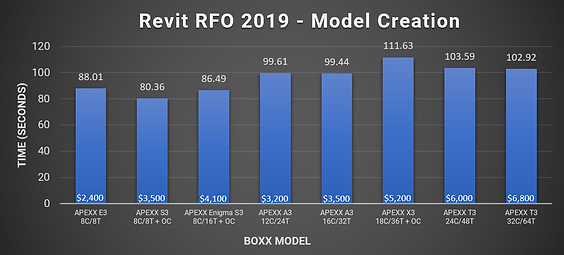
Revit, Model Creation Benchmark

Let’s move on to Goal #2. Most tasks in Revit are lightly threaded, and each step of model creation is calculated sequentially, which means having lots of CPU cores doesn’t help. Instead, a higher per-core frequency is needed to speed things up (this holds true for exporting models as well), which is typically found in CPUs with fewer cores.

Overall, with BOXX workstations, there is much less variability across models, with the APEXX S3 and E3 systems scoring better. The professionally overclocked APEXX S3, with its eight cores running at a stable 5.1 GHz, performed the best. And again we see the APEXX A3 models sit in the middle of the scores. However, this time the 12-core version seems more promising than it did in Blender, as it is a bit less expensive and scored almost identically to the 16-core variant. But considering the fact that speeding up model creation is a secondary goal, the ideal choice here once again seems to be the 16-core APEXX A3.

The Price–Performance Ratio:

Let’s say you’re looking to spend somewhere between $3-5K on a new system, which is about average for a premium desktop workstation these days. The 16-core APEXX A3 scored well in lightly-threaded and multi-threaded workloads, which is a must for the workflow presented, and it sits comfortably inside that price range. While it isn’t the absolute best in either category, it’s certainly no slouch and is attractively priced compared to other models that provide similar performance in either Revit or Blender.

The T-Class models are also an option, as their performance in Revit wasn’t terrible by comparison; however, they are a bit pricier, so you’d need to figure out if the extra features and time saved justifies the cost.*** If you need more than 128GB of RAM, or spending more now is going to allow you to take on a couple more projects a month, you may be able to justify the added cost rather quickly.

Final Thoughts

Based on the criteria presented—with accelerated rendering times being most important (and assuming you don’t require the features of more expensive models)—I’d call the 16-core APEXX A3 the best fit. It’s also a good choice in terms of future upgrade prospects, as it is currently compatible with the fastest PCIe Gen 4 M.2 SSDs on the market, and will be ideal for future PCIe Gen 4 video cards.**** Those Gen 4 devices only need half as many lanes to provide the same data throughput as Gen 3,***** which means that even with the limited number of PCIe lanes on the APEXX A3, you’ll be less limited than if you got a model with a similar amount of lanes on another CPU platform.

BOXX is committed to finding the BOXX workstation that best matches your workflow. We also use premium components that are built to last and accelerate your productivity for all sorts of applications across several industries. If you’d like to learn more, give us a call +44 (0) 1256 378 044, or consult with a BOXX performance specialist today.

** For example, the APEXX S3 and APEXX Enigma S3 can both be configured with either an 8C/8T or 8C/16T CPU.

*** The APEXX T3 also can be configured with a 64-core CPU, however, the cost of that configuration fell outside the bounds of this exercise.

**** PCIe Gen 3 devices will work with Gen 4 motherboards but will only provide Gen 3-level performance.

***** PCIe Gen 3 max throughput is ~1GB per lane, while PCIe Gen 4 is ~2GB per lane.

Testing the New SOLIDWORKS Engine

Testing the New SOLIDWORKS Engine

SOLIDWORKS is currently beta testing a new engine. Historically, CAD application performance has relied entirely on the speed of a handful of high-frequency cores. However, like lots of professional software these days, SOLIDWORKS is being reworked to take better advantage of the latest GPUs. Therefore, now is a good time to compare performance of CPUs and GPUs across the current and upcoming engine, and demonstrate how a BOXX workstation is the best choice for your workflow.

These benchmarks provide an accurate representation of the performance comparisons between components by testing common tasks in SOLIDWORKS 2019 (Service Pack 2). They also give users a good idea of what performance will look like for three BOXX models designed specifically for running CAD software: the APEXX E2, APEXX S3, and APEXX X3.

This post only features benchmark highlights. For an in-depth look at our data and methodology, click the icon below:

READ THE WITE PAPER

* Lightly threaded applications will run 1-2 cores at the higher speed and heavily threaded apps will run all engaged cores at the lower speed.

Results – CPU

Load and Rebuild Times
The overclocked 9700K and 9900K performed virtually identically in the new engine and gave the best viewport performance out of all the configurations. This is not surprising, as SOLIDWORKS is designed to function best on a small number of cores at high frequency. In general, times did not change much for any of the CPUs tested across current and new engines, however, load times were slightly higher for the overclocked 9980XE in the current engine, while they remained much the same in the new.
FPS
Frames per second evened out noticeably for all CPUs in the beta engine, while the current engine maintained an extremely low fps (<4 fps) with the 9980XE (stock and overclocked). This is of course due to the heavily CPU-bound nature of the current engine.
Render Times
As expected, render times did not change much between the current and new engine when only comparing processors. Across both engines, the 9980XE (stock and overclocked) performed best, achieving >2x faster render times compared to the 9700K.

Results – GPU

FPS
We saw no improvement in fps in the current engine among any of the GPUs. They all performed basically the same, achieving around 5 fps. Of course, we chose the same settings for the current engine and the beta to show the drastic difference in performance between the two versions. Realistically, if using the current engine, the user would trade some visual fidelity for a more workable model and get around 20–30 fps.
Comparing the older NVIDIA Quadro P4000 (Pascal architecture) and the newer Quadro RTX 4000 (Turing architecture) in the beta engine, we saw an increase of 38 fps with the RTX card at 1080p, as well as an increase of 23 fps at 2160p. The highest fps recorded was the RTX 6000 (163 fps at 1080p). The “worst” performing card was the P4000 with 48 fps at 1080p, which would still provide a very smooth and workable experience.
Load, Rebuild, and Rotation Times
The biggest takeaway between the two engines was the reduction in rotation time, going from around three minutes in the current engine to ranging between 5–20 seconds in the beta engine.

Recommendations

Regarding upcoming SOLIDWORKS releases, a single Quadro RTX 4000, P4000 or even P2000 should be sufficient for most users’ basic needs. That said, the Quadro RTX 4000 falls right in the sweet spot when considering both price and performance. However, if your workflow includes extremely complex models, multiple displays, or you work in UHD (4K/8K), a multi-GPU setup with Quadro RTX cards would be beneficial.
Regardless of the processor, using a Quadro RTX 4000 (or higher) would also be beneficial if users want to utilize multiple monitors at once, and/or drive multiple CAD software instances at once. Of all the models we compared, the APEXX X3 has the highest GPU power budget (1,000 watts) to allow for the most high-end video cards in a single system.[*]
If you work with complex models at 2160p and want to maintain a comfortable 60 fps, an Intel® Core™ i7-9700K (non-overclocked) combined with an NVIDIA Quadro RTX 4000 is a good solution. That can be found in the APEXX E2. However, it’s also worth noting that the percent advantages of professionally overclocked processors (5–10%) translate relatively linearly to more time-consuming operations that users may be dealing with. For example, if you want to add the fastest load and rebuild times, you could upgrade to the overclocked APEXX S3, which offers more room for hard drives.
If you want a well-rounded system that provides fantastic load/rebuild times on top of blazing fast rendering, you can’t go wrong with the APEXX X3. According to our tests, adding a Quadro RTX card (or two) to the mix will yield excellent results in the upcoming engine. In that case, you’ll have a handful of high-frequency cores to build your models with, then plenty of cores to lean on when rendering. That’s why they call it the multi-tasker.
__________________________________________________________________
[*] Read more about GPU power budgets here.

GeForce vs Quadro: What’s the Difference?

GeForce vs Quadro: What’s the Difference?


There’s a lot to keep up with technology-wise these days. It’s no surprise that the average person may not have the time to do a deep dive into every technological breakthrough, even if it’s something that could have a direct impact on their day-to-day workflow.

For instance, you may be aware of NVIDIA’s two most popular GPU product families: GeForce and Quadro. You may even know that GeForce cards are mostly designed for the general consumer space, while Quadro cards are meant for professional workloads. But you may not know some of the technical details behind why the cards are segmented this way.

When Quadro was first introduced, it was specifically aimed at accelerating professional workloads, particularly in CAD, and that remains true today. GeForce, meanwhile, is largely marketed toward gamers and is also great at creating seamless virtual reality experiences via VirtualLink, which combines power, video and data feed into a single USB-C cable.

Speaking of, both GeForce RTX and Quadro RTX cards have USB-C ports.1 These are mainly intended to charge your phone, connect an external drive, headphones, or power virtual reality headsets. However, Quadro has an extra feature: the ability to disable that USB-C port. It may seem strange at first, but for organizations where data security is vitally important, this is hard to do without, especially when you have fleets of computers scattered across multiple locations, or simply want to protect your company’s data.

Then there’s VRAM, which is a GPU’s onboard memory. The highest-end GeForce card, the Titan RTX, has 24GB of VRAM. Meanwhile, the Quadro RTX 8000 blows it away by having a massive 48GB of ECC, or error-correcting code memory, which automatically fixes many common data errors. That much fancy VRAM comes at a higher cost, sure, but it’s worth it if you’re running serious workloads like a GPU rendering farm, visualizing weather patterns, or training deep neural networks, tasks that are always hungry for VRAM. Sync cards are another benefit absent from GeForce, which allows you to run a large number of synchronized displays off a single card, which is needed in things like flight simulators.

Additionally, some Quadro (and some GeForce) cards have the ability to add an NVLink bridge, a high-speed interconnect that literally and figuratively links two cards together which allows for faster communication between them via a mesh network that eschews the old master/slave relationship of SLI. Most importantly, using this bridge on two Quadro cards combines the VRAM of both GPUs into a single resource that can, for example, be used in rendering to tackle much larger, complex scenes. However, it’s important to note that NVLink functionality is highly dependent on the application, and is sometimes not actually beneficial. While its usefulness is currently very limited, more software developers may choose to support it in the future.

Another important distinction is that every single Quadro card is manufactured internally by NVIDIA, whereas GeForce cards are often built and sold by third-party vendors. NVIDIA keeping the Quadro cards isolated in this way ensures a consistent level of quality, which is important to businesses that are always looking for a stable, long-term solution. In that vein, Quadro cards also offer longer warranties, enhanced IT management capabilities, and even come with drivers that are designed with longevity in mind. Basically, they come with all the features you’d want in a professional environment.

Since BOXX caters to creative professionals looking to accelerate their workflows and maximize ROI, we often recommend Quadro RTX cards because they do things like significantly shorten render times in software like OctaneRender, boost photorealism while working on scenes in Autodesk Maya, and create a more fluid viewport experience in SOLIDWORKS. These are differences that not only make your life easier but allow you to finish projects sooner, which affects your bottom line.

BOXX products range from the ultra-compact APEXX S1 all the way to the massive 8-GPU rack-mounted monster that is the RAXX W4G, and each one is designed to house at least one Quadro (or GeForce) card. Check our website or consult with a BOXX performance specialist to learn more.

Still Running Windows 7? Well, Stop It

Still Running Windows 7? Well, Stop It


Released back in 2009, Windows 7 was one of the most popular operating systems ever. In fact, it is still being used by nearly a third of businesses today. However, that number is likely going to drop dramatically in the coming weeks—or at least, it definitely should.

As of January 14, 2020, Microsoft officially ended support for Windows 7. What does this mean, exactly? It means no more software updates, security fixes, or technical support. In the interest of not mincing words, for anyone still running Windows 7, if you haven’t upgraded to Windows 10 already, it is vitally important that you consider doing so.

Systems running Windows 7 will continue to function as normal, with one major caveat: using a Windows 7 PC connected to the internet is in a monumentally more vulnerable position than it was mere weeks ago. Exploits for operating systems old and new are constantly being found, and with supported operating systems (e.g., Windows 10), these holes are being plugged on a consistent basis, hence the need for those pesky iterative security updates.

But Microsoft has officially stopped plugging those holes for Windows 7, which means your PC will be left wide open to all sorts of malicious attacks (e.g., trojans, worms, and viruses), and with no way of defending itself. Additionally, even if your PC manages to not become infected, any sort of technical issue you have with your machine will be met with a shrug. Basically, if you use Windows and want to ensure your computer continues to function properly, upgrading to Windows 10 right now is a genuine necessity.

Odds are, if you’re still running a Windows 7 machine, your hardware may be due for an upgrade as well. BOXX sells custom workstations, laptops, and servers designed for a wide range of professional applications. Contact us if you would like to find out how we can help you.


Wi-Fi 6: Innovation Comes in Waves

Wi-Fi 6: Innovation Comes in Waves


Wireless technology has had a long and winding history. Starting with ALOHAnet in 1971, which connected the Great Hawaiian Islands; to the precursor to the 802.11 protocol developed in the Netherlands in the 1980s; to an Australian radio-astronomer who became “the father of Wi-Fi” after a failed experiment to detect exploding mini black holes. Over the past 50 years, we’ve come a long way. And as you may have already guessed, things are getting even better.

Officially known as 802.11ax, Wi-Fi 6 is the emerging standard of wireless technology. In a nutshell, it provides speeds up to 38% faster, *75% lower latency, and reduces bandwidth congestion in crowded networks. With up to 4x higher network capacity, the primary benefit is that more devices will be able to work concurrently, and at faster speeds, without feeling sluggish.

It accomplishes this largely by increasing the efficiency of the delivery of data packets. Instead of a single packet being delivered to a single client, multiple packets can be sent to multiple clients at the same time. This is great news, as there have never been more smart devices constantly sending and receiving data in our daily lives, from phones and tablets to thermostats and refrigerators. Wi-Fi 6 also comes with better power management, which allows devices to draw less power over time, and avoids creating unnecessary interference between connections.

Exciting as this may be, there are still some things to keep in mind. First, upgrading to a Wi-Fi 6-compatible device is only half the answer. If you want those faster speeds in your home or business, you’ll need to upgrade your router as well. Secondly, it’s important to note that the maximum speed dictated by your internet provider could be a limiting factor. That said, the speed of devices connected to your fancy new wireless network would likely get a healthy boost with these upgrades.

WLAN Protocol AKA Frequency Max Data Rate**

802.11b Wi-Fi 1 2.4 GHz 11 Mbps

802.11a Wi-Fi 2 5 GHz 54 Mbps

802.11g Wi-Fi 3 2.4 GHz 54 Mbps

802.11n Wi-Fi 4 2.4 GHz + 5 GHz 600 Mbps

802.11ac Wi-Fi 5 2.4 GHz + 5 GHz 6.77 Gbps

802.11ax Wi-Fi 6 2.4 GHz + 5 GHz 10.75 Gbps

Having said that, this new standard is still evolving. In fact, just a few weeks ago the Wi-Fi Alliance, a non-profit organization that certifies Wi-Fi products and owns the Wi-Fi trademark, announced something even newer: Wi-Fi 6E, which will extend connectivity to the 6 GHz band for the first time. This will provide a completely clear frequency spectrum with zero legacy interference, which is currently a big problem, especially in the overcrowded 2.4 GHz range, making an upgrade even more attractive.

However, the actual usage of this new frequency is still at the behest of regulators. Once it’s approved, the Wi-Fi Alliance predicts wide implementation and sees this standard is particularly useful in industrial sectors for things like machine analytics, remote maintenance, or virtual employee training. Although that’s very exciting for the future, it’s not particularly helpful today. Additionally, it will take a while for all our ubiquitous smart devices to become Wi-Fi 6 compatible. All that to say, the best time to upgrade your router is likely later rather than sooner.

Switching to technology that actually is worth upgrading to today, look no further than BOXX. We pride ourselves on being first-to-market with the latest high-end computer hardware that accelerates your productivity in professional applications to make your job easier. Consult with a BOXX performance specialist or check out our website to learn more. And don’t forget to upgrade the firmware on that refrigerator.

* Single user data rate. ** Figures show theoretical aggregated capacities of 2.4 GHz and 5 GHz frequencies.